Quick Summary: Meituan (美团) and Eleme (饿了么) are China’s dominant food delivery apps. Meituan now has a built-in English language option — switch it on in Settings and the main navigation and service pages render in English, while restaurant names, menus, and reviews stay Chinese (camera translation covers the rest). Pay via WeChat Pay or Alipay. Delivery fees run ¥0–6 (often free with promos), minimum orders ¥15–30, delivery in 20–40 minutes. Once set up, these apps transform daily life in China.
Food delivery works best once WeChat Pay or Alipay is live — the Chinese Internet Survival Guide sequences all the setup steps in order.
Why Food Delivery Is Central to Life in China
Food delivery in China operates at a scale unlike anywhere else. In major cities:
- Delivery arrives in 20–35 minutes on average
- Available 24 hours in most neighborhoods
- Covers restaurants, grocery, pharmacy, bubble tea, and convenience items
- Delivery fee is ¥0–6 (~$0–0.80), often ¥0 with promos — essentially free
For expats, especially in the first weeks before you know local restaurants or when working late, food delivery is a genuine quality-of-life tool, not a luxury.
Two main platforms:
- Meituan (美团): Larger restaurant selection, also covers grocery and services
- Eleme (饿了么): Alibaba-owned, slightly smaller, integrated with Alipay
Most expats use Meituan. This guide covers Meituan; Eleme works similarly.
Setup: Getting Meituan Working
Step 1: Get the App
Meituan app (美团): Available on App Store and Google Play.
There are several Meituan apps — you want 美团 (the main app covering food, grocery, and hotel), not 美团外卖 (standalone delivery app, which works too but has less functionality).
Step 2: Register
Meituan registration requires a Chinese phone number. This is the main barrier for foreigners.
If you have a Chinese SIM card: Register directly with your Chinese number.
If you only have a foreign number: the app’s sign-up screen has a country-code picker and many overseas numbers can receive the SMS code — but this path isn’t officially documented, code delivery is inconsistent, and payment binding plus login checks work best with a +86 number. The reliable fallbacks: use the Meituan mini-program inside WeChat or Alipay (no separate registration), or get a Chinese SIM card first (see SIM card guide). Each path compared in Meituan phone number options that actually work.
Step 3: Set Your Delivery Address
This is the trickiest step if you can’t read Chinese.
- Open Meituan
- Tap the location/address field at the top
- Search your address — try typing your street name in pinyin or English (Meituan’s search can handle some English input)
- Alternatively, use the map to pin your location manually
- Add building number, floor, and unit details
Tip: Save your address in Chinese characters. Google Translate → type your address in English → copy the Chinese output → paste into Meituan. Ask your landlord or building manager for the exact Chinese address if unsure.
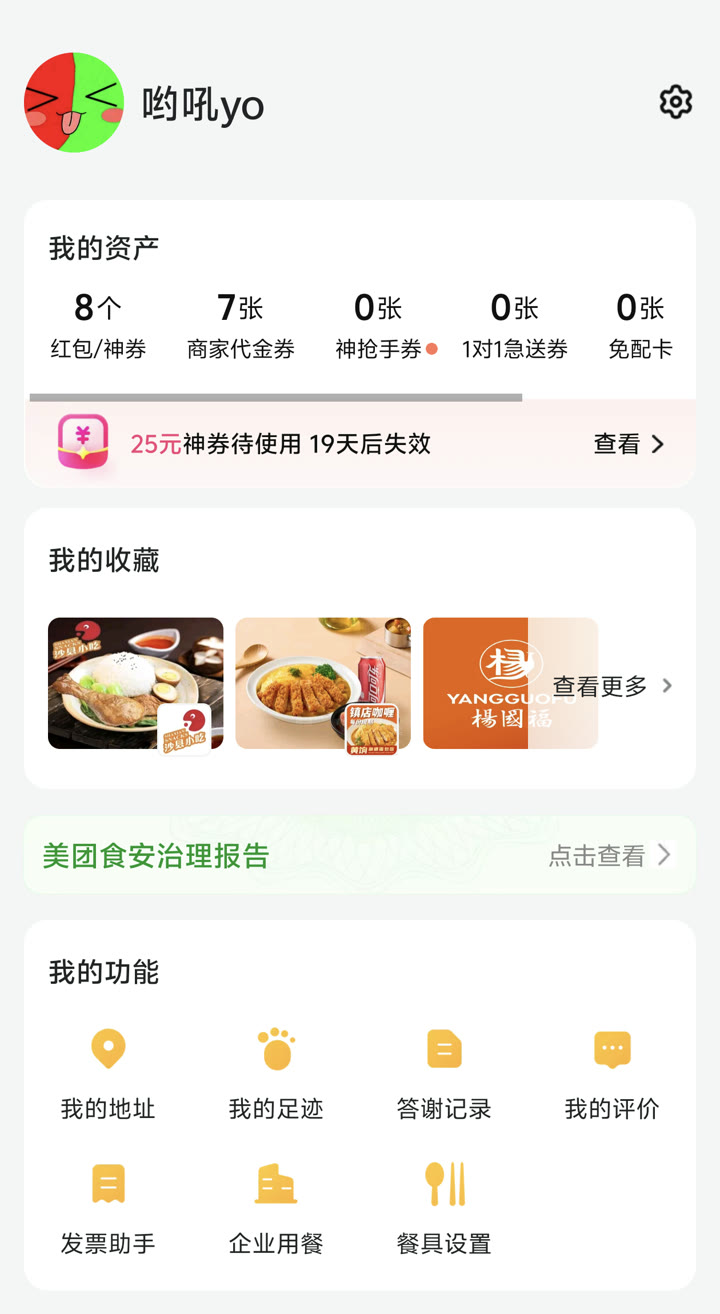 Finding “My Address” (我的地址) under your profile settings to configure building, floor, and apartment details.
Step 4: Link Payment
Meituan accepts:
- WeChat Pay — most common, seamless
- Alipay — works equally well
- UnionPay cards — Chinese bank cards
- International Visa/Mastercard — limited support, works on some plan types
Most foreigners pay via WeChat Pay or Alipay (see respective guides).
Navigating the App in English
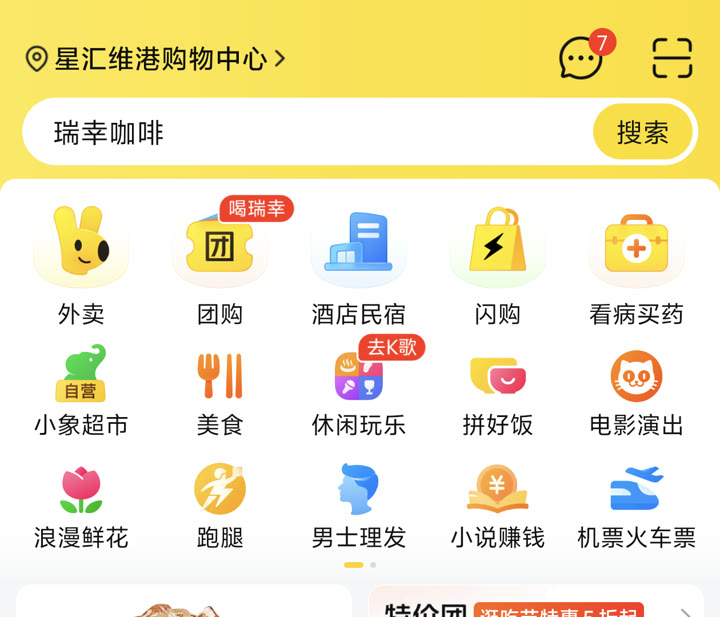 Meituan main app homepage: tap the yellow “Waimai” (外卖 - Food Delivery) icon on the top left or hotel/grocery shortcuts.
Yes — Meituan has an official, built-in English interface. There is no separate “Meituan English version” app to download: English is a language setting inside the regular mainland app, and it’s listed among the app’s official App Store localizations. How to change Meituan to English:
- Tap Me (我的) in the bottom-right corner
- Tap the gear icon (设置) for Settings
- Tap Language (语言) — the row shows the available languages, English among them
- Select English and save
What translates: the platform layer — main navigation and major service pages (Delivery, GroupBuy, Hotels, Restaurants, Travel) render in English. What doesn’t: merchant-generated content. Restaurant names, dish names, menus, and reviews stay Chinese, with some machine-translated on the fly (a brief “Translating” spinner appears on those cards). In practice, Meituan’s English coverage is best described as platform-level translation only, and still limited: the app’s own buttons and categories come over, but everything merchants write does not — that gap is why camera translation (below) remains part of the standard setup. Coverage is still expanding — the language settings page itself says more pages and languages are coming. Verified November 2026 on app v12.68+.
Keeta Is a Different App — and It Doesn’t Cover Mainland China
Keeta is Meituan’s separate international brand: a different app built for Hong Kong (since 2023), Saudi Arabia (since 2024), and Brazil (launched 2025). It isn’t distributed in mainland China’s app stores and doesn’t deliver anywhere inside mainland China. If you’re ordering food in Shanghai, Chengdu, or anywhere else on the mainland, Keeta is irrelevant — the regular Meituan app above is the one that works. Wondering about Eleme’s English situation instead? See the Eleme section below.
Watch Out for Third-Party “Meituan English” Apps
App stores and search results also surface unofficial “Meituan English” or “Meituan in English” wrappers — repackaged or modified clients claiming to add English. They are not made or endorsed by Meituan (the official app is published by Sankuai Technology). With a wrapper, your login credentials and every payment step flow through untrusted code — that’s a direct account and payment risk — and anything done inside an unofficial client falls outside Meituan’s official customer-service and refund channels if an order goes wrong. The built-in language setting plus camera translation covers the same need without any of it.
Using Google Translate Camera Mode
For the parts that stay Chinese — dish names, option popups, reviews — the most practical approach:
- Open Google Translate → tap the camera icon
- Point at your phone screen showing the Meituan interface
- Text translates in real-time on screen
Works well for reading menu items, restaurant names, and navigation buttons.
Key Buttons to Recognize
Even in English mode, merchant pages, order-status texts, and calls/messages from riders stay Chinese. Learning these characters saves time:
| Chinese | What It Means |
|---|---|
| 外卖 | Food delivery |
| 附近 | Nearby |
| 搜索 | Search |
| 加入购物车 | Add to cart |
| 结算 | Checkout |
| 确认订单 | Confirm order |
| 备注 | Notes (to restaurant) |
| 无需餐具 | No chopsticks/cutlery needed |
| 配送费 | Delivery fee |
| 预计送达 | Estimated delivery time |
| 已取餐 | Order picked up |
| 配送中 | On the way |
| 已送达 | Delivered |
Browsing Restaurants
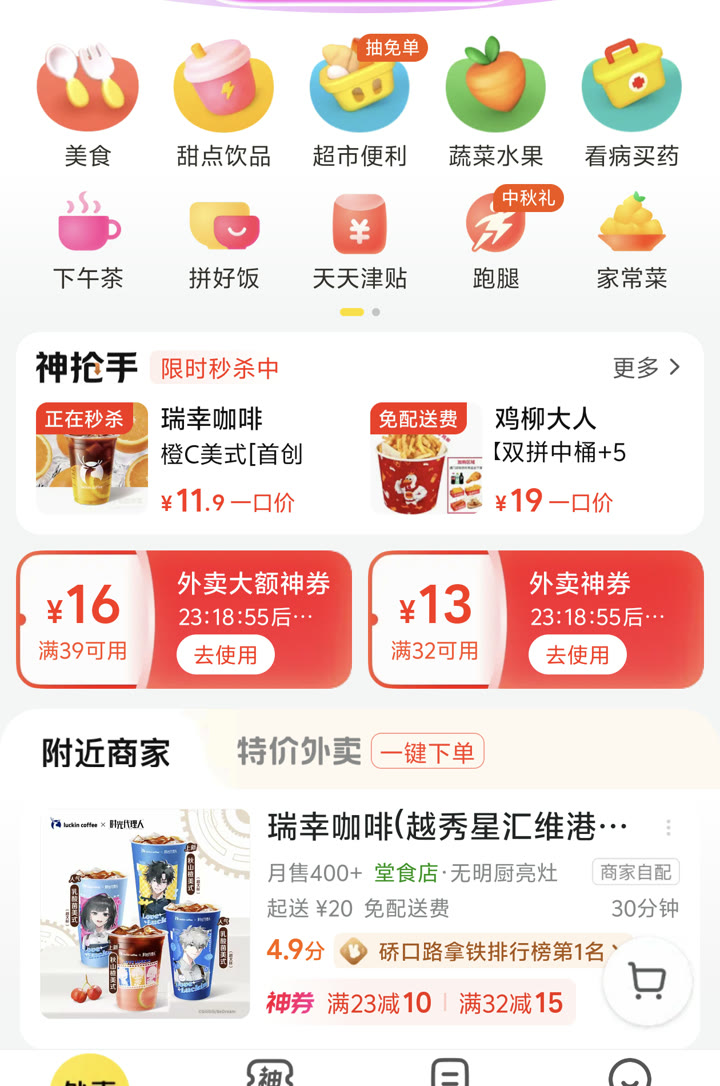 Meituan delivery feed: filter by cuisine categories, view merchant ratings, minimum order threshold, and delivery fees.
On the Meituan home screen:
- Top section: Category icons (fast food, Chinese, Japanese, desserts, etc.) — icons are recognizable
- Restaurant list below: Sorted by distance/rating by default
- Each restaurant card shows: Photo, name, rating (⭐), monthly orders, delivery time, delivery fee, minimum order
Filters: You can filter by cuisine type using the icons. The food category icons (汉堡 = burger, 日料 = Japanese, 火锅 = hotpot) are fairly intuitive with the visual icons.
Ordering Food
Selecting a Restaurant
Tap any restaurant. You’ll see:
- Menu categories on the left sidebar
- Items with photos on the right
- Price per item
-
- button to add to cart
Photos save you: Most menu items have photos. Point, tap, add to cart. You don’t need to read the name.
Customizations
Many items have options (size, spice level, add-ons). A popup appears — use Google Translate to read if needed. Common options:
| Chinese | Meaning |
|---|---|
| 不辣 | Not spicy |
| 微辣 | Slightly spicy |
| 中辣 | Medium spicy |
| 超辣 | Very spicy |
| 小 / 中 / 大 | Small / Medium / Large |
| 去冰 | No ice |
| 少冰 | Less ice |
| 加冰 | Extra ice |
Checkout
- Review cart (shopping cart icon, usually bottom right)
- Confirm delivery address
- Add notes if needed (备注) — you can write in English, some restaurants have English-reading staff
- Select payment method
- Confirm order
Tracking Your Order
After ordering, you’ll see:
- Real-time map showing rider location
- Estimated arrival time
- Status updates: 已接单 (accepted) → 制作中 (preparing) → 已取餐 (picked up) → 配送中 (on the way) → 已送达 (delivered)
Delivery Notes for Apartments and Compounds
Chinese apartment complexes (小区) often have closed gates. Riders typically call when they arrive at the gate.
If a rider calls you:
- Say your building and unit number in Chinese, or
- Go down to meet them at the gate, or
- Have a standard message ready: “我在[楼号]楼[单元号]单元[房间号],请等我下来” (I’m in building X, unit Y, room Z — please wait for me to come down)
Contact-free delivery: Meituan has a “no-contact delivery” option (无接触配送) where the rider leaves your order at the gate or building lobby. Good option if you’re not ready to communicate.
How Much Does Delivery Cost
What you actually pay is food price + delivery fee + packaging fee, with menu prices usually a touch above the walk-in price. Here’s the full breakdown (verified October 2026):
| Line item | What it costs | Notes |
|---|---|---|
| Delivery fee (配送费) | ¥0–6 typical (¥6–15 long distance) | Often ¥0 during promos or with vouchers; the exact figure always shows at checkout before you pay |
| Packaging fee (打包费) | ¥1–3 for a simple meal; ¥3–6+ for BBQ/hotpot | Charged per container, so it stacks; shown as a separate line and not counted toward spend-based discounts |
| Minimum order (起送价) | ¥15–30 (¥20 is the most common) | Set per restaurant; Meituan’s budget 拼好饭 group-buy tier covers many sub-¥15 single meals |
| Peak / bad-weather surcharge | a few extra ¥, varies | Late-night orders add roughly ¥1–2; heavy rain or extreme heat triggers a small surge — the checkout screen is always the final word |
The delivery fee is dynamic — it’s priced from distance first, then time of day and weather, which is why the same restaurant can charge ¥0 at lunch and ¥6 in a rainstorm. Verified October 2026.
Packaging fees are itemized by rule, not by courtesy. Meituan’s platform rules require merchants to clearly display every charge before you pay — no unmarked fees allowed (verified October 2026 on rules-center.meituan.com). So the total you see at checkout is the total you pay.
Tipping: there is no tipping culture in China. The app does have an optional tip button (打赏, preset ¥2/5/10) on the post-delivery review screen, and some people use it in heavy rain — but riders don’t expect tips, and a 5-star rating remains the standard thank-you.
Delivery vs. eating in: expect online menu prices to run ~20–30% above the same restaurant’s in-store prices (that markup funds platform commission, packaging, and the discount mechanics). After spend-threshold discounts (满减) and vouchers, your final total usually lands close to — but often slightly above — the dine-in bill once fees are added. Verified October 2026. For how to shave these fees down, see Saving Money on Delivery.
Meituan Beyond Food Delivery
Meituan is more than food delivery:
Grocery and Convenience (美团买菜 / 闪购)
Order groceries, drinks, household items with 30-minute delivery. Select 超市 (supermarket) or 便利店 (convenience store) category in the app.
Pharmacy Delivery (药品)
Many pharmacies are on Meituan — order common medications and OTC drugs for delivery. Useful when sick and can’t go out.
Hotel Booking (酒店)
Meituan is also a major hotel booking platform — competitive prices for domestic hotels.
Restaurant Reviews (大众点评)
Dianping (大众点评) is a separate but Meituan-owned restaurant review app — like Yelp for China. Essential for finding restaurants when you’re out exploring. The full walkthrough — English settings, queue tickets, group deals, and the Meituan-vs-Dianping decision — lives in our Dianping for foreigners guide.
Meituan vs Eleme (饿了么): Which Delivery App Should You Use?
Eleme (饿了么) is Meituan’s main competitor, owned by Alibaba — same core job (restaurant delivery to your door) with different strengths. One naming note: Eleme’s standalone app now ships in China’s app stores under the 淘宝闪购 (Taobao Shangou) brand, with 饿了么 still in the listing subtitle — same service, same company (Shanghai Rajax, Alibaba’s delivery arm). Searching either name finds it.
Side by side for foreigners (each row from official listings and platform rules, verified November 2026):
| Dimension | Meituan (美团) | Eleme (饿了么 / 淘宝闪购) |
|---|---|---|
| Coverage | Nationwide; the larger restaurant selection of the two, especially outside tier-1 cities | Nationwide city coverage (“full-area, all-category” network); thinner restaurant choice in smaller cities |
| Foreign card payment | Pay via WeChat Pay or Alipay wallet (your international card rides inside the wallet); direct Visa/Mastercard binding inside the app is limited and hit-or-miss | Same wallet path; the Alipay mini-program just uses your existing Alipay setup — international card already wired, nothing new to bind |
| English usability | Built-in English setting, official and verified (platform-level translation; menus and reviews stay Chinese) | English is in the app’s official store localization, but no verified full English interface — menus stay Chinese; via the Alipay mini-program you get Alipay’s English UI around it |
| Membership price | ~¥20/month delivery-voucher membership, worth it at 4+ orders per week | Equivalent voucher card (超级吃货卡) — pricing is personalized, shown in-app |
The decision, straight:
- Pick Eleme if you’re living in the Alipay ecosystem: the mini-program needs no separate registration, your address and payment carry over from Alipay, and Eleme sometimes runs Alipay-exclusive promos. The smoothest first order on a short trip.
- Pick Meituan if you want the verified English interface, the biggest restaurant selection (it keeps the edge in smaller cities), or you’re setting up for a long stay.
The Alipay Guest-Mode Path to Eleme
The smoothest Eleme route for foreigners runs through Alipay — no separate Ele.me account required. Alipay’s international version registers with your foreign number and passport, links your international card (Visa/Mastercard and more — no Chinese bank account needed), and runs in English; the Eleme mini-program inherits all of it:
- Open Alipay (set up per our Alipay for foreigners guide)
- Search 饿了么 (or 淘宝闪购) in the Alipay search bar
- Tap the official mini-program — your Alipay identity, addresses, and payment method carry over
- Set your delivery address in Chinese (paste from a translation app or ask your hotel), order, and pay with your existing Alipay setup
Boundaries: the mini-program’s merchant menus stay Chinese (screen translation covers them, same as anywhere), and its feature set can lag the standalone app slightly. Last verified November 2026.
What expat communities say: this exact Meituan-or-Eleme question is a recurring topic in Reddit’s China travel and expat communities — a thread like “As a foreigner in China, how do you typically order food” draws 50+ comments, and Reddit holds two of the top spots for “best food delivery app china” searches. The recurring advice in those threads matches the decision above: use the mini-program instead of wrestling the standalone app, pay through your wallet rather than binding cards in-app, and leave a translated delivery note for the rider. Treat it as anecdotal community consensus, not a professional benchmark.
Saving Money on Delivery
Meituan Membership (美团会员)
Monthly subscription (~¥20/month) that provides:
- Free delivery vouchers (usually worth ¥60–80/month in delivery fee savings if you order daily)
- Discounts at partner restaurants
- Worth it if you order 4+ times per week
Red Packet Vouchers (红包)
Meituan frequently distributes discount coupons. Check the “My Vouchers” section (我的优惠券) before ordering — you may have unused coupons.
New User Promotions
New accounts often get significant discounts on first 3–5 orders. If someone registers for you, you lose this benefit — try to register yourself from day one.
Ordering Meituan for Family or Friends in China While You’re Abroad
You can’t place the order yourself from overseas — Meituan has no international app, no cross-border payment, and every order needs an account inside China with a Chinese delivery address. What works is one of three setups where someone (or a courier) inside China executes the order and you cover the money. Steps, blockers, and real costs for each, verified September 2026.
Option 1: Their Account, Your Money (What Most People Do)
- Your friend or relative orders on their own Meituan account — their usual address (or the recipient’s), restaurant, cart, checkout. Delivery fees ¥0–6 and minimum orders ¥15–30 apply exactly as normal.
- They pay in seconds with their own WeChat Pay or Alipay.
- You reimburse them from abroad. Wise sends USD (and 40+ currencies) to CNY at the mid-market exchange rate with no hidden markup — the exact fee is shown before you send and runs a few US dollars on typical small amounts. The money lands directly in their Alipay or WeChat wallet (a one-time prompt to link a bank card) or their bank account; Wise says 74% of transfers arrive in under 20 seconds. That’s dramatically cheaper than a classic bank wire.
Blockers: essentially none. This is the default answer on every community thread for a reason.
Choose it when: the person is already on Meituan and you’re comfortable settling up — recurring care for parents or a partner works exactly the same way. The money-saving mechanics above (membership vouchers, red packets) apply on their account, so a ~¥20/month membership can offset ¥60–80 of delivery fees on your dime.
Option 2: Shared Account (Close Family Only)
- Your Meituan account — already registered with a working payment method — gets used inside China on your relative’s phone.
- They set the delivery address to the recipient’s and order as usual.
Blockers (real ones):
- Login verification: a new device or a new city can trigger an SMS check to the registered number — whoever physically holds that SIM passes the check. If the SIM is yours and you’re abroad, you’re relaying codes across time zones. (Need to receive Chinese SMS codes with no +86 SIM? See our guide to Chinese phone numbers for verification (OTP).)
- Courier calls route to the registered number, and refunds or pharmacy orders expose order details to whoever owns it — community reports are blunt about avoiding borrowed numbers for anything recurring.
- Payment runs through the account’s own wallets. Bind your international card to WeChat Pay or Alipay first, then pay via the wallet inside Meituan — binding a foreign card directly inside Meituan is hit-or-miss.
Choose it when: it’s genuinely one household (partner, parents) and one-off favors — not recurring orders across accounts.
Option 3: Meituan Errand Service (跑腿), Ordered by Someone Inside China
- Inside the Meituan app, the 跑腿 (errand) feature dispatches a courier to buy and deliver almost anything — food from a restaurant that isn’t on delivery, groceries, pharmacy runs — to any address in the city.
- Someone inside China places the errand order for the recipient’s address; the cost of the items is settled inside the order.
What it costs (verified Sep 2026; varies by city and service type): the price is quoted as base fee + distance + weight — roughly ¥12–15 base within ~5 km in tier-1 cities, ¥8–10 in smaller cities, about +¥1 per extra kilometer, and +20–30% at peak times or in bad weather, plus the items themselves. The app shows the exact price before anyone confirms.
Blockers: it still must be ordered from a Chinese account inside the country — you can’t dispatch a courier from abroad, and item availability depends on what the courier can find.
Choose it when: the recipient can’t order for themselves (elderly parents managing apps), or the thing they need isn’t on any delivery platform.
Meituan for Foreigners: Phone Number Options That Actually Work
Short answer: the sign-up screen has a country-code picker and many overseas numbers can receive the SMS code and register (verified Sep 2026) — but Meituan doesn’t officially document overseas numbers, SMS delivery is inconsistent, and payment binding plus login risk control work best with a +86 number. If your foreign number fails, use the Meituan mini-program inside WeChat or Alipay, or register once you have a Chinese SIM.
The four realistic paths, compared:
| Path | Does it work? | Stability | Main risk / blocker | Best for |
|---|---|---|---|---|
| +86 SIM (physical) | Yes — Meituan’s default | Rock solid | Requires passport + a carrier-store visit inside China (how to get one) | Anyone living in China |
| Overseas number in the Meituan app | Usually — the country-code picker exists; +60/+65 registrations confirmed by travelers | Hit-or-miss: SMS delivery is inconsistent, and login checks can re-trigger later | Payment binding and risk control favor +86; riders can’t reliably call foreign numbers | Short trips, pre-arrival setup |
| WeChat / Alipay mini-program | Yes — no separate Meituan registration | Stable — rides on your verified WeChat/Alipay identity and payment | Fewer features than the standalone app (bike rental, for example, still wants +86) | Tourists, first orders, anyone whose app registration fails |
| Someone registers for you | Technically yes | Works until a login check or refund needs that person’s number | You lose new-user promos; refunds and order history sit with the number owner | Last resort only |
Why foreign numbers sometimes fail
Often it’s the plumbing, not you. International SMS gateway compatibility is patchy, the server can flag an overseas sign-up as a high-risk connection, and Meituan’s 106-prefixed codes land in many phones’ spam filters. Before giving up: check your blocked-messages list for numbers starting with 106, re-enter the country code without a leading zero, and switch from Wi-Fi to cellular data if you see “server busy.”
Real-name verification and switching to +86 later
- Passport real-name: Meituan Wallet prompts for identity verification — a passport photo is increasingly accepted, though approval can take time.
- The smoother order of operations (community consensus for anyone moving to China): local SIM → WeChat Pay/Alipay real-name verification → bind the wallet inside Meituan → add your Chinese address. If you started with a foreign number and it works, you can usually keep the account and swap the number in settings once you have a +86 SIM.
- If what you actually need is Chinese SMS verification codes — for Meituan login checks or any other mainland app — and you don’t have a +86 SIM, the legitimate options (Hong Kong carrier add-on numbers, passport-registered virtual numbers) are covered in our Chinese phone number for verification (OTP) guide.
FAQ
Is the food safe on Meituan?
Yes — Meituan vets restaurants and shows health inspection scores. Restaurants with high order volumes and good ratings are generally reliable. The platform has made food safety a priority following regulatory pressure.
Can I tip the delivery rider?
There’s a tipping option during or after delivery, but tipping is not culturally expected in China. Rating the rider 5 stars after a good delivery is the standard appreciation.
What if my order is wrong or doesn’t arrive?
Contact Meituan customer service through the app (after-order complaint process). Meituan generally resolves issues quickly — refunds or remakes are common for verified problems.
Can I order at 2am?
Yes, in most cities. Meituan operates 24/7, though selection is limited after midnight. In major cities, dozens of restaurants remain open for delivery through the night.
Does Meituan work with a foreign phone number?
Partially. The app’s sign-up screen has a country-code picker and many overseas numbers can register, but SMS delivery is inconsistent and payment binding plus login risk control work best with a +86 number — Meituan doesn’t officially document overseas numbers. If your number fails, use the WeChat/Alipay mini-program (no separate registration) or register with a Chinese phone number. Full path-by-path comparison: phone number options that actually work.
Can I order Meituan delivery for a friend in China while I’m abroad (e.g., from Singapore)?
Only with help from inside China. Meituan has no international ordering or cross-border payment, so you can’t place the order from overseas yourself. What works in practice: their account + your money (they order, you reimburse via Wise — most people do this), a shared account (close family only — login checks and refunds complicate it), or Meituan’s errand service (跑腿) ordered by someone inside China (roughly ¥8–15 base + distance + peak surcharges). Steps, blockers, and real costs for each: ordering Meituan for someone in China while you’re abroad.
If you’re about to move to China, set up Meituan during your first week — it’s one of the highest-impact apps to get working early.
Can I use Meituan in English?
Yes — Meituan has an official English language option built into the mainland app (Me → Settings → Language → English; verified November 2026 on app v12.68+). It translates Meituan’s own navigation and service pages; restaurant names, menus, and reviews stay Chinese, so keep your phone’s camera translation handy. There’s no separate English app to install: Meituan’s international app Keeta serves Hong Kong and overseas markets and doesn’t do mainland delivery, and unofficial “Meituan English” wrapper apps aren’t Meituan’s — skip them (they put your account and payment details at risk). Full walkthrough: navigating the app in English. Set your default address and payment method once, and reordering your usual spots takes just a few taps.
Which is better in China: Meituan or Eleme?
Both work — it depends on your setup. Meituan wins on English usability (official built-in English setting, verified November 2026) and on restaurant selection, especially outside tier-1 cities. Eleme wins on the zero-setup path: its Alipay mini-program needs no separate registration and rides your existing Alipay payment, address, and English UI. Alipay already set up on a short trip? Start with Eleme’s mini-program. In China long-term or want an English interface? Set up Meituan. Full comparison table and decision guide: Meituan vs Eleme.
Related Guides
- WeChat for Foreigners — Pay via WeChat for seamless Meituan ordering
- Alipay for Foreigners — Alternative payment for Eleme
- Best Apps for Travelling in China — where food delivery fits in the full app stack
- Wuhan Food Guide — What to eat and which restaurants to search for
Votre guide de confiance pour la vie en Chine.
© 2026 China Neighbor ·Article original : · Dernière vérification :Nov 5, 2026
Toute reproduction doit citer la source et renvoyer à l'original.