Booking China Train Tickets on 12306 — Official Platform (No Service Fee)
- Setting Up 12306 for Foreigners
12306 now has English language support: download the 12306 app, select English on the welcome screen (or Settings → Language), register with phone number + password, then add a passenger — your name as on passport, passport number, nationality. 12306 accepts WeChat Pay, Alipay, and (in 2026) UnionPay; the checkout also takes international Visa/Mastercard/JCB cards directly (billed in RMB), but foreign-card declines are common — WeChat Pay or Alipay is the most reliable route.
- Booking on 12306
Enter departure and destination stations, select date and search, choose train → select seat class → select specific seat (seat map available), confirm passenger details, then pay via WeChat Pay or Alipay. No service fee — you pay the face value of the ticket.
- Boarding with 12306 E-Ticket
12306 issues e-tickets. At the station: use the self-service machine with your passport to print, go through the gate directly (the gate reads your passport at some newer stations), or show the ticket QR code from the 12306 app at the gate.
Frequently Asked Questions
Can I board a train in China without printing my ticket?
Yes — on most modern stations, you can board using just your passport. Some G train stations support completely paperless entry. But for safety, use the ticket machine to print your ticket if you're unsure.
What if my train is delayed?
High-speed rail in China is remarkably punctual — delays are uncommon. When they occur, you'll receive an announcement at the station. Significant delays entitle you to compensation (handled at service desks).
Is it safe to travel by train in China?
Extremely safe. China's high-speed rail has an exceptional safety record. Conventional trains also have a strong safety record. Train travel in China is significantly safer than road travel.
Can I travel without a seat reservation?
On regular (non-high-speed) trains, some seat types (hard seat) may not require a specific seat reservation. On G/D high-speed trains, every ticket is a specific seat reservation.
Can I register a 12306 account as a foreigner without a Chinese phone number?
Yes — the English platform signs you up with a passport plus an email or overseas phone number. After registering, you must pass a one-time passport verification and add yourself as a passenger before you can book. For the full workaround playbook, see Train Tickets Without a Chinese Phone Number.
Is there a China train app for foreigners?
Yes — the official 12306 app has full English support and charges no service fee: download it from the App Store or Google Play and select English on the welcome screen. Trip.com is the paid alternative — a ~¥10–30/ticket service fee, but no in-app passport verification and painless international card payment.
Why did my foreign card payment fail on 12306?
Two usual causes: your bank's fraud rules, and 12306's nightly maintenance window (01:00–05:00 China time). The checkout accepts international Visa/Mastercard/JCB cards, but foreign-card declines are common. Retry once, then switch to WeChat Pay or Alipay with your foreign card linked. If it still fails, book the same train on Trip.com — international cards and PayPal accepted for a small service fee.
Does 12306 work in English?
Yes — the 12306 app and the English website (12306.cn/en) both run full English interfaces: registration, seat maps, checkout, and e-tickets included. Switch via the welcome screen or Settings → Language in the app.
Can I book China train tickets without WeChat?
Yes. WeChat Pay is optional: 12306 checkout also takes Alipay and international Visa/Mastercard/JCB cards, and every station's staffed ticket window (售票处) sells tickets for cash or scan-to-pay — passport in hand, no app required.
Does a China train ticket include travel insurance?
No — but you can add it for ¥3. 12306 checkout offers an optional Railway Passenger Accident Insurance (乘意险): ¥3 per adult ticket for up to ¥300,000 accident cover plus ¥30,000 medical, valid between the departure and arrival station gates (Last verified: 2026-10). Many travelers skip it and rely on their own travel insurance.
Can you order food delivery on a train in China?
Yes — on G/D high-speed trains, the 12306 app's Food & Specialties (餐饮·特产) service brings restaurant meals straight to your seat. Order in the app (or scan the QR code on your armrest) at least an hour before the train reaches a participating station — roughly 90+ major hubs qualify — and pay with Alipay or WeChat Pay. Note the 12306.cn/en website can't do this, only the app. The full walkthrough is in the food delivery section.
Quick Summary: Buy China train tickets on Trip.com (easiest for foreigners, English interface, international card) or the official 12306 app (cheaper, no service fee, now has English). Collect physical tickets at the station with your passport, or board using your passport and ticket number directly. Book 30 days in advance for popular routes during holidays.
The China Rail System
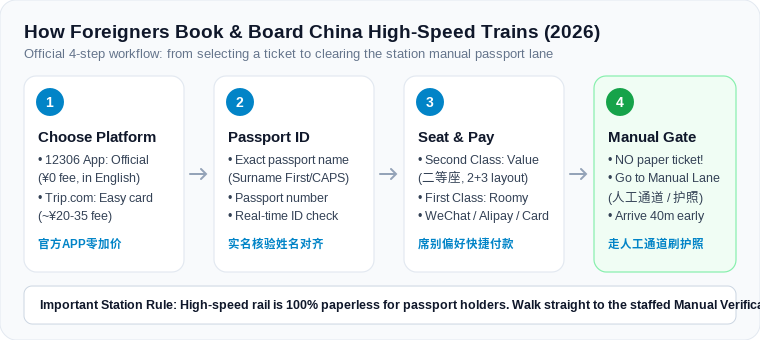 Official 4-step workflow for foreign travelers: choosing 12306 or Trip.com, real-name passport verification, seat selection, and clearing the manual gate.
China’s rail network is the world’s largest, comprising:
- High-speed rail (高铁 gāotiě / 动车组 dòngchē zǔ): Trains running 250–350 km/h. Designated by prefixes G (highest speed), D (fast), or C (intercity). Modern, comfortable, punctual.
- Regular trains (普通列车): Slower, cheaper, overnight options. Designated T (express), K (fast), Z (direct express), or just a number. Overnight sleeper trains are a practical option for very long distances.
Key ticket facts:
- Tickets go on sale 30 days before departure
- Peak periods (Golden Week, Spring Festival, Chinese New Year) sell out in hours — set a calendar reminder to book the moment tickets open
- Seat classes: Second Class (二等座) standard; First Class (一等座) more space; Business Class (商务座) lie-flat on G trains
Option 1: Trip.com (Ctrip) — Easiest for Foreigners
Best for: First-time users, anyone without a Chinese payment setup, English-first experience
Website/App: trip.com (formerly ctrip.com)
Steps
- Open Trip.com (app or web)
- Tap Trains
- Enter departure city, destination, and date
- Select your train from the results
- Choose seat class (Second Class is standard; First Class for more comfort)
- Enter passenger details — passport number is required
- Pay with international Visa/Mastercard or PayPal
- Receive e-ticket confirmation
Trip.com Fees
Trip.com charges a service fee of approximately ¥10–30 per ticket (varies by route and booking region). This is the tradeoff for the English interface and international payment.
Collecting Tickets at the Station
For Trip.com bookings, you still need to collect a physical ticket at a self-service machine or ticket window:
- Go to the 自动取票机 (ticket machine) in the station
- Insert your passport (the machine reads the chip or barcode)
- Machine prints your ticket
- Done
Or: At some stations, you can board with your passport directly — the attendant scans your passport against the booking. Check your Trip.com confirmation for which method applies.
Option 2: 12306 — Official Platform (No Service Fee)
Best for: Regular train users, saving on service fees, anyone with WeChat Pay or Alipay set up
Website: 12306.cn
App: 12306 (available on both iOS and Android)
Setting Up 12306 for Foreigners
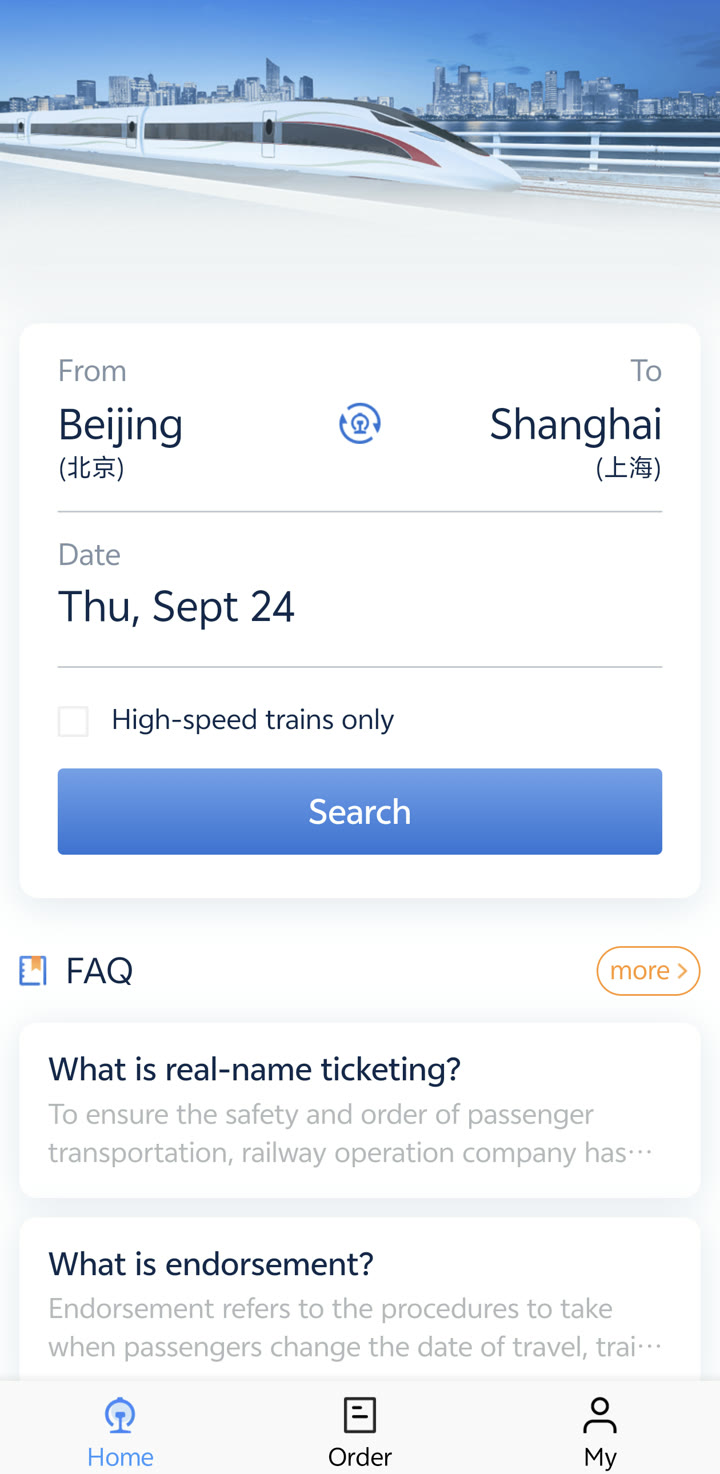 12306 app language settings: switching from Chinese to the dedicated English traveler interface.
12306 now has English language support:
- Download 12306 app
- Select English on the welcome screen (or Settings → Language)
- Register: foreign passport + overseas phone number or email + password (no Chinese number required on the English platform)
- Add passenger: your name as on passport, passport number, nationality
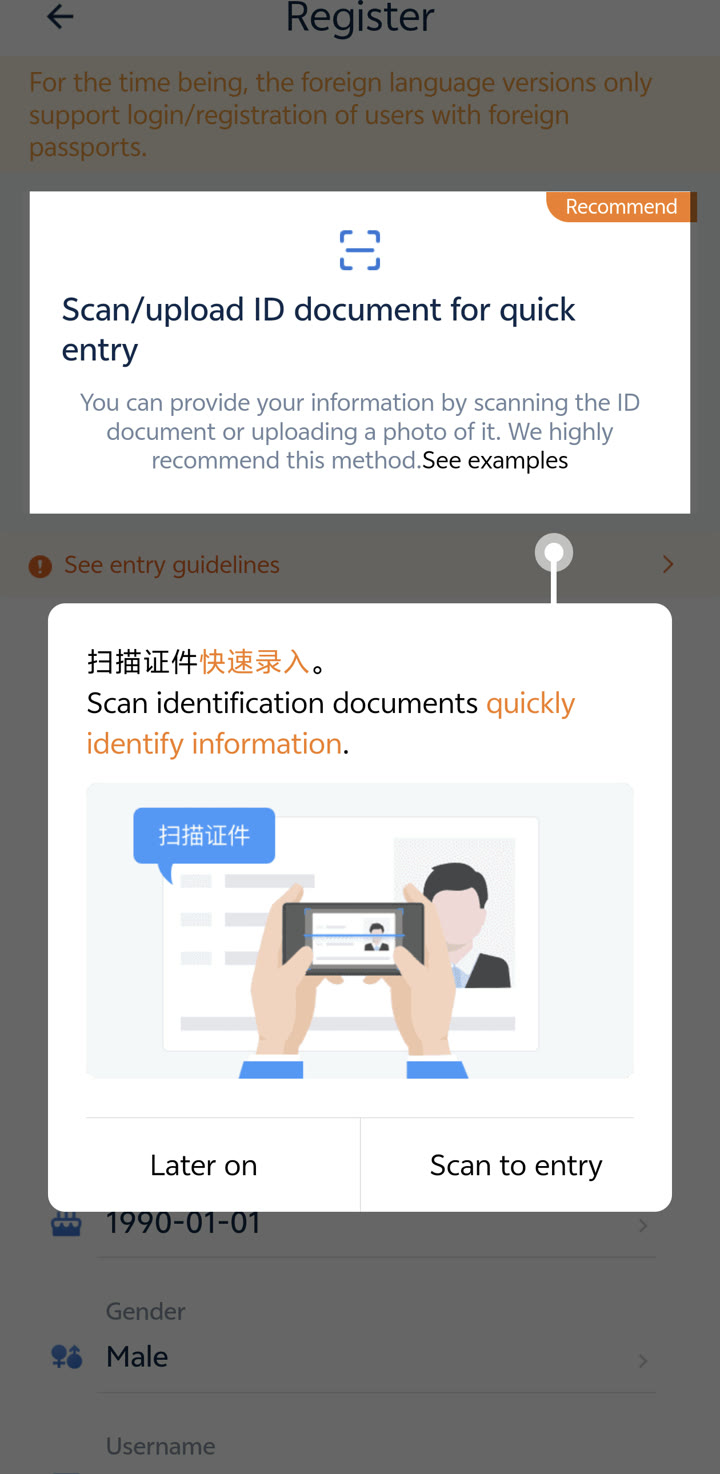 12306 English traveler registration: adding foreign passport details for real-name verification.
Payment: 12306 accepts WeChat Pay, Alipay, and (in 2026) UnionPay. The checkout also takes international Visa/Mastercard/JCB cards directly (billed in RMB), but foreign-card declines are common — WeChat Pay or Alipay (with your foreign card linked) is the most reliable route.
Passport Verification on 12306
Before you can pay, your passport needs a one-time real-name verification. Three steps:
- Register — create your account on the English platform with your passport plus an email or overseas phone number. Enter your name exactly as it appears on the passport bio page: surname and given name separated by a single space, no punctuation.
- Add yourself as a passenger — in My Passengers, add a passenger with your name as on passport, passport number, and nationality. Anyone you book for must be added here and pass the same verification.
- Wait for verification — the app shows the status. Foreign passports typically clear within a few hours to 1–3 business days. While it shows “pending”, don’t delete and re-create your account — that resets the review queue.
If verification fails or stalls: take your original passport to any railway station ticket window (售票处) and ask the staff to verify it in person — larger stations can clear it on the spot. You only do this once; verified passports stay valid for future bookings.
Last verified: 2026-10 (12306 English site) — verification rules change often, so re-check before you travel.
Booking on 12306
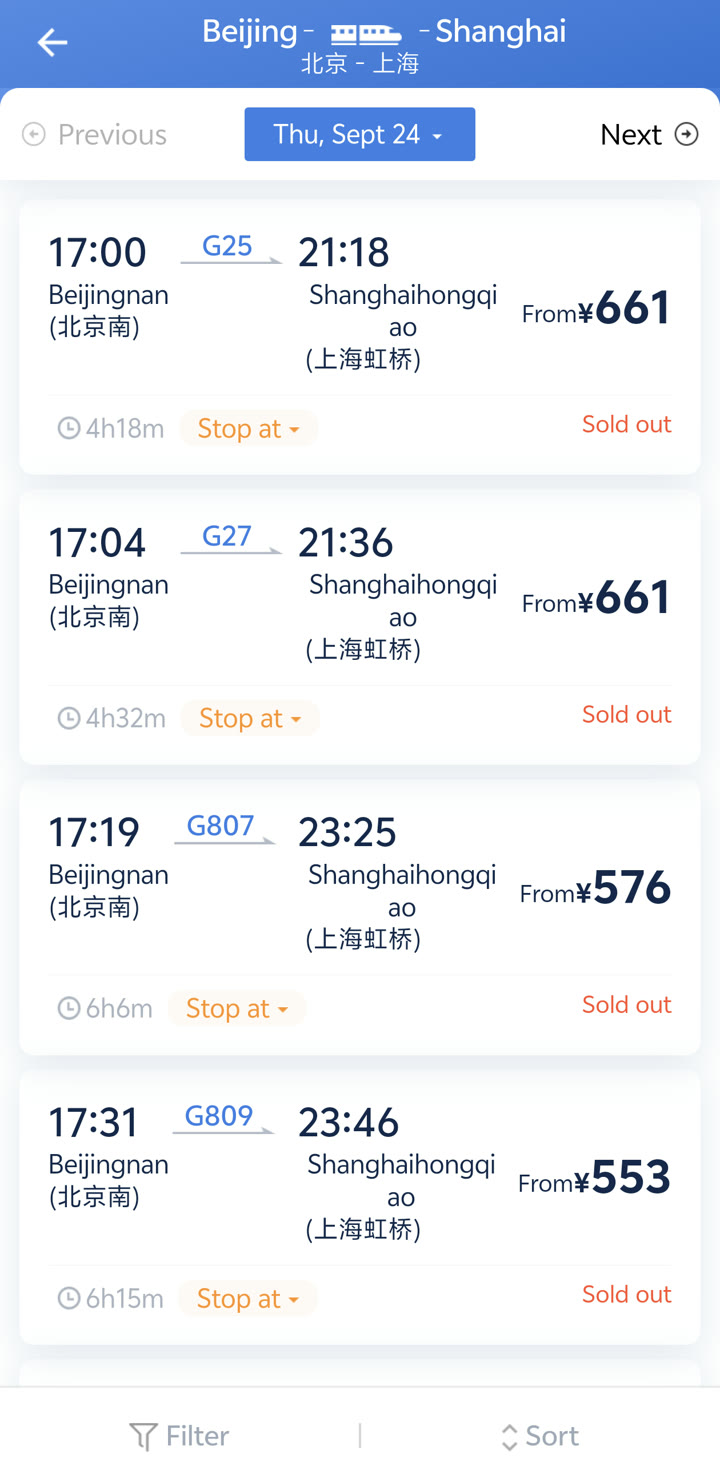 High-speed train lookup on 12306 showing bilingual station names, train numbers (G/D), and seat availability.
- Enter departure and destination stations
- Select date and search
- Choose train → select seat class → select specific seat (seat map available)
- Confirm passenger details
- Pay via WeChat Pay or Alipay
No service fee — you pay the face value of the ticket.
Boarding with 12306 E-Ticket
12306 issues e-tickets. At the station:
- Use the self-service machine with your passport to print, or
- Go through the gate directly: the gate reads your passport (some newer stations support this), or
- Show the ticket QR code from the 12306 app at the gate
Option 3: Station Ticket Window
Best for: Situations where online booking failed, last-minute purchases, peace of mind
No Chinese phone number? That specific bottleneck has its own playbook — see Train Tickets Without a Chinese Phone Number.
Every train station has human ticket windows (售票处). The process is simple:
- Queue at the 售票处 (ticket sales window)
- Hand your passport through the window
- Indicate your destination, date, and class (writing it down or showing it on your phone is fine)
- The clerk finds a train and quotes the price
- Pay cash or scan to pay WeChat/Alipay
- Receive printed ticket
Language barrier: Most ticket clerks speak only Chinese. Write your journey on your phone: [Departure City] → [Destination City], [Date], [Number of people], [Class preference]. This works.
Understanding Train Stations
Arriving at the Station
Chinese train stations are large — arrive at least 30 minutes before departure (45 minutes for busy stations or unfamiliar ones).
Station layout:
- Enter the station building → security screening (bags through X-ray)
- Find your waiting hall (候车室 hòuchē shì) — platforms are locked until ~10–15 minutes before departure
- Wait in the waiting hall → watch departure board for platform (站台) announcement
- Gates open → queue → board the train
Your ticket shows:
- Train number (e.g., G502)
- Departure station and time
- Arrival station and time
- Carriage number (车厢 chēxiāng) and seat number (座位 zuòwèi)
Matching Your Carriage
Carriages are numbered along the platform. When you board, check your carriage number and walk along the platform to find it. Carriage numbers are displayed on the platform and on the carriage doors.
Seat Classes Explained
High-Speed Rail (G/D Trains)
| Class | Chinese | Description | Price Multiplier |
|---|---|---|---|
| Business Class | 商务座 | Lie-flat seat, wide, premium service | 4–5x Second |
| First Class | 一等座 | Wider seats (2+2 layout), more legroom | ~1.6x Second |
| Second Class | 二等座 | Standard (2+3 layout), comfortable | Base price |
For most foreigners: Second Class is perfectly comfortable for journeys under 3 hours. For 4+ hour journeys, First Class is worth considering.
Regular/Overnight Trains
| Class | Chinese | Description |
|---|---|---|
| Hard Seat | 硬座 | Fixed seats, 3+2 configuration, no reservation possible for some |
| Soft Seat | 软座 | More comfortable seats |
| Hard Sleeper | 硬卧 | 3-tier bunk beds, open berths, very common |
| Soft Sleeper | 软卧 | 4-berth closed compartment, more privacy |
| Deluxe Soft Sleeper | 高级软卧 | 2-berth compartment on premium trains |
Overnight train recommendation: Hard Sleeper (硬卧) is the standard Chinese experience and perfectly comfortable. Middle berth is a good balance of accessibility and privacy. Soft Sleeper gives you a closable compartment door.
On the Train
Food and Drinks
Dining car (餐车): Available on most long-distance trains. Hot food, noodles, beer. Prices are higher than street food but reasonable.
Cart service: Attendants push carts selling instant noodles, packaged snacks, drinks. There are hot water dispensers at the end of each carriage — bring a cup noodle and add water.
Bring your own: For high-speed rail, bringing your own snacks and drinks is common and expected.
All three options above are instant buys on board. There is a fourth way: pre-order food delivery to your seat before the train even arrives at the station.
Food Delivery to Your Seat (12306)
Yes, you can order food delivery to your seat on China’s G/D high-speed trains — it’s the official 12306 “Food & Specialties” (餐饮·特产) service. Restaurants and chains at the stations along your route prepare your order, hand it to the train staff on the platform, and an attendant delivers it right to your seat, typically within about 30 minutes after your train pulls out of that station.
How to order food delivery on a China train:
- Open the 12306 app and tap 餐饮·特产 (Food & Specialties) on the home screen — or scan the Railway Travel Code QR sticker on your seat armrest after boarding.
- Enter your train number and date; the app lists the upcoming stations that support delivery and each station’s restaurants.
- Order at least 1 hour before your train arrives at the delivery station — some merchants cut off earlier, as shown at checkout.
- Confirm your carriage and seat number (auto-filled when your ticket was booked in the same 12306 account), pay with Alipay or WeChat Pay, and track the order in the app.
Coverage: delivery is available at roughly 90+ major hub stations (Beijing, Shanghai Hongqiao, Guangzhou South, Xi’an North and other large G/D stops), with chain restaurants like KFC and McDonald’s plus local restaurants and regional specialties varying by station. The exact list for your trip only shows in-app, so check before you ride.
Foreigner notes (Last verified: November 2026):
- The English website (12306.cn/en) doesn’t offer food ordering — it’s ticketing only. The official app does run in English, but the restaurant menus and ordering flow are mostly in Chinese; keep a screen translator handy.
- Passport-registered 12306 accounts order food the same way as Chinese accounts. Tickets bought through Trip.com don’t appear automatically — link the trip in the app or use the seat QR-code route.
- Food orders take Alipay or WeChat Pay only — the international Visa/Mastercard checkout that works for tickets doesn’t apply to food.
- Food orders are separate from tickets: if you refund or change your ticket, cancel the food order yourself in the app (before the merchant’s cutoff) or it won’t be refunded.
If your train skips every supply station — short hops under an hour, or regular-speed trains — stick with the dining car, the cart, or your own snacks.
Power Outlets
G trains have power outlets at each seat (some D trains have them per row). Charge your devices. Bring a multi-plug adapter if you have multiple devices.
WiFi
Some trains have WiFi, but it’s slow and may not connect foreign phones. Plan to use offline content during the journey.
Luggage
No luggage allowance system — you manage your own bags. Overhead racks exist but space is limited on busy trains. Large bags go in the designated areas at the carriage ends.
Cancellations and Changes
Refund Policy
- Cancellation >15 days before departure: Full refund
- Cancellation 8–15 days before: 5% fee
- Cancellation 2–8 days before: 10% fee
- Cancellation 0–2 days before: 20% fee
- No-show: No refund (must cancel before train departure)
How to Cancel
12306: In-app refund process
Trip.com: Customer service or in-app cancellation (Trip.com’s service fee is typically non-refundable)
Station window: Present ticket within refund window
Changing Tickets
You can change the date/time of a ticket (for a fee) before the original departure. Go to the ticket window at any train station.
Tips for Common Routes
Wuhan → Shanghai (G trains, ~5 hours)
- G trains from Wuhan Station (武汉站) to Shanghai Hongqiao (上海虹桥) or Shanghai Station
- Second Class: ¥350–450; First Class: ¥550–700
- Book 30 days out for weekend travel; weekdays usually available short-notice
Wuhan → Beijing (G trains, ~4.5 hours)
- G trains from Wuhan Station to Beijing West (北京西)
- Second Class: ¥400–530; First Class: ¥640–850
- Busy route — book in advance for weekends
Golden Week Booking Strategy
During Golden Week (October 1–7) and Chinese New Year (January/February), train tickets are among the most contested in the world — 400+ million trips happen in a 40-day period.
Book exactly when the 30-day window opens: Tickets for October 1 departures go on sale September 1 at 00:00 Beijing time. Set an alarm. The best trains and seats sell out in minutes.
Not sure whether your trip dates land in a holiday rush? The 2026 China holiday schedule lists every break and the make-up workdays, with a checker that flags Golden Week collisions.
Related Guides
- China Metro Guide — Getting around within cities
- DiDi for Foreigners — Taxis and ride-hailing
- How to Pay in China — WeChat Pay and Alipay for ticket purchases
- Hong Kong to Shenzhen & Guangzhou — Cross-border train travel
Your trusted guide for life in China.
© 2026 China Neighbor ·Original article: · Last verified:Nov 5, 2026
Reproduction requires attribution with a link to the original.