Setting Up Alipay
- Download Alipay
iOS: download from the App Store — if you've switched your App Store to a Chinese account, switch back to your home country App Store, which has better English support and full foreigner functionality. Android: Google Play Store or APK from alipay.com. Both "Alipay" (international) and "支付宝" (China domestic) work for foreigners as of 2026, but the international version has better English support.
- Register
Open Alipay → tap Sign Up. Enter your phone number (international numbers work), enter the SMS verification code, set a login password, and set a 6-digit payment passcode (keep this separate from your login password).
- Link Your International Card
Tap the Profile icon → Bank Cards → Add Card. Enter your Visa or Mastercard details (card number, expiry date, CVV, billing address) and verify via SMS sent to your registered phone. Supported cards include international Visa, Mastercard, American Express, Discover, JCB and Diners Club. With international cards: up to $5,000 per transaction and $50,000 per year (cumulative); single transactions at or below ¥200 are free, above ¥200 a 3% service fee applies (last verified September 2026, per the PBOC Shanghai Head Office / Shanghai Municipal Government payment guide for foreigners).
- Identity Verification
Tap Profile → Identity Verification, select Foreigner / Non-mainland resident, enter your passport number and expiry date, and take a selfie photo for face recognition. Verification usually completes within minutes. Without identity verification, Alipay still works for payments, but some services (financial products, certain government services) are restricted.
常见问题
Is Alipay free to use?
Yes — the app is free, and sending money to individuals is free. Merchants pay a small processing fee (0.1–0.6%). Currency conversion when using a foreign card may include a small fee.
Do I need a Chinese phone number to use Alipay?
No — you can register with an international phone number. However, a Chinese number increases your account trustworthiness and unlocks certain features.
What fees and limits apply to international cards on Alipay?
Fees: single transactions at or below ¥200 are free; above ¥200, a 3% service fee applies (your home bank's foreign-transaction fee, if any, is separate). Limits: regulatory caps of up to $5,000 per transaction and $50,000 per year apply to foreign-linked cards on both Alipay and WeChat Pay. Exact figures can vary by card and are adjusted periodically — check your card's management page in the app (last verified September 2026). For a long-term stay, opening a Chinese bank account removes both the fee and the caps.
Can I use Alipay outside China?
Yes, in two ways. First, your Alipay works at Chinese merchants' overseas locations and at international merchants that accept Alipay — common across Asia, and increasingly in Europe and North America. Second, the setup you made for China (linked international card) travels with you, though some China-specific services (like certain mini-programs) only make sense inside mainland China. Note: the old prepaid "TourPass" mini-program was phased out in 2026 — direct card binding in the main Alipay app replaced it.
What's the difference between Alipay balance and linked card?
Alipay balance (余额): RMB stored in Alipay. Can be topped up from Chinese bank accounts or received from other users. Earns small interest. Linked card: Charged directly when you pay. Converted at current exchange rate at time of transaction. For foreigners without Chinese bank accounts, linked international card is the standard approach.
Can I withdraw money from Alipay to my foreign bank account?
Limited. Alipay allows withdrawals to linked Chinese bank accounts easily. Withdrawing to international accounts is possible but involves more steps and limits. For occasional large transfers, a Chinese bank account is more practical.
Quick Summary: Alipay now accepts international Visa and Mastercard cards — no Chinese bank account required. Download the app, register with your phone number, link your card, verify with your passport, and you’re ready to pay anywhere in China within 15 minutes. Set it up alongside WeChat Pay — having both ensures you’re never stuck.
Alipay is half of China’s payment duopoly — for how it fits with WeChat, connectivity, and real-name verification, see the Chinese Internet Survival Guide.
What Is Alipay?
Alipay (支付宝 Zhīfùbǎo) is China’s second-largest mobile payment platform, operated by Ant Group (an Alibaba affiliate). In China, Alipay and WeChat Pay together handle the vast majority of all retail transactions.
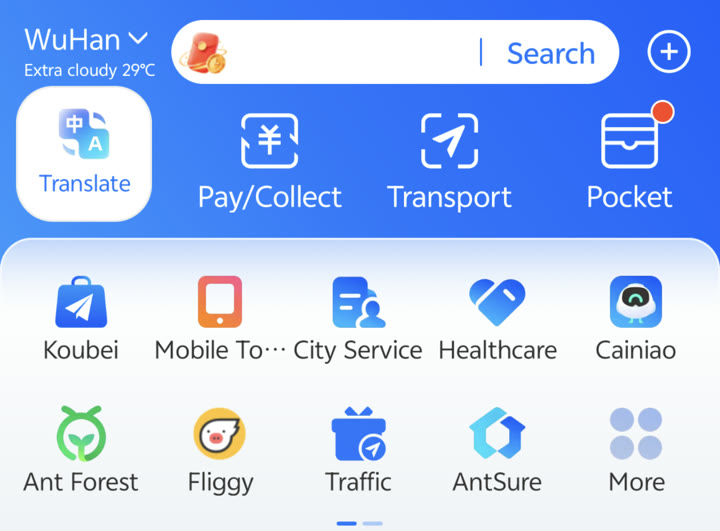 Alipay English interface homepage: shortcuts for Translate, QR code payments, Transport hub, and essential city services.
Where Alipay is especially strong:
- Taobao and Tmall online shopping (Alibaba’s platforms)
- Smaller merchants who prefer Alipay over WeChat Pay
- Government services and hospital booking (some cities use Alipay Health)
- International merchants with Alipay QR code (airports, tourist sites)
- Ant Forest (environmental rewards program built into Alipay)
Why set up both Alipay and WeChat Pay: Different merchants prefer different platforms. Some night market stalls, small shops, and online services only accept one. Having both means you’re always covered.
Setting Up Alipay
Step 1: Download Alipay
iOS: Download from App Store. If you’ve switched your App Store to a Chinese account, switch back to your home country App Store — the international version has better English support and full foreigner functionality.
Android: Google Play Store or APK from alipay.com.
Note: There are two versions floating around — “Alipay” (international) and “支付宝” (China domestic). Both work for foreigners as of 2026, but the international version (Alipay) has better English support.
Step 2: Register
- Open Alipay → tap Sign Up
- Enter your phone number (international numbers work)
- Enter the SMS verification code
- Set a login password
- Set a 6-digit payment passcode (keep this separate from your login password)
Step 3: Link Your International Card
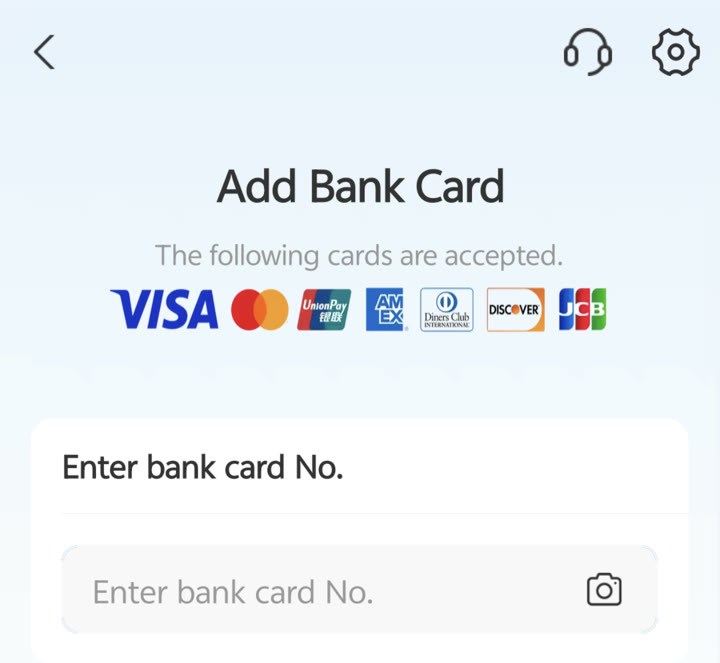 Alipay’s “Add Bank Card” screen in English, officially supporting Visa, Mastercard, UnionPay, American Express, Diners Club, Discover, and JCB.
- Tap the Profile (or Me) icon → Bank Cards → Add Card
- Enter your international card details:
- Card number (or tap the camera icon to scan)
- Expiry date
- CVV / CVC
- Billing address
- Verify via 3D Secure / SMS OTP sent by your issuing bank
Supported cards: International Visa, Mastercard, American Express, Discover, JCB, and Diners Club — as well as international UnionPay cards. As of 2026, coverage covers all major global payment networks.
Fees and limits with international cards (last verified September 2026, per the PBOC Shanghai Head Office / Shanghai Municipal Government payment guide for foreigners):
- Per transaction: up to $5,000 (~¥36,000)
- Per year (cumulative): up to $50,000 (~¥360,000)
- Service fee: single transactions at or below ¥200 are free; above ¥200, a 3% service fee applies
These caps are set by Chinese regulators and apply equally to Alipay and WeChat Pay when you pay with a foreign-linked card — unlike the early days (2023–24), neither wallet has a lower cap than the other. Exact figures can vary by card and are adjusted periodically, so confirm yours on the card’s management page inside the app. Your own bank’s foreign-transaction fee (if any) is charged on top of Alipay’s 3%.
Step 4: Identity Verification
For full functionality (higher limits, more services), verify your identity:
- Tap Profile → Identity Verification
- Select Foreigner / Non-mainland resident
- Enter your passport number and expiry date
- Take a selfie photo for face recognition
- Verification usually completes within minutes
Without identity verification: Alipay still works for payments, but some services (financial products, certain government services) are restricted.
How to Pay with Alipay
Scanning a Merchant QR Code
- Open Alipay → tap Pay (扫码 or QR icon)
- Scan the merchant’s QR code
- Enter the amount (some merchants’ systems enter it automatically)
- Confirm with payment passcode or Face ID
Showing Your Payment Code
- Open Alipay → tap Receive (收款) or open the payment screen
- Show the QR code on your screen
- Merchant scans it
- Payment deducted automatically
Tip: Keep payment code screen brightness high — dim screens sometimes fail to scan.
Online Shopping (Taobao/Tmall)
Alipay integrates directly with Taobao and Tmall. When you check out, Alipay is the default payment option. Even with an international card, you can complete purchases — though some sellers may not ship internationally.
Alipay Key Features for Foreigners
Alipay Mini Programs (小程序)
Similar to WeChat Mini Programs — lightweight apps within Alipay.
Useful for foreigners:
| Mini Program | Function |
|---|---|
| DiDi | Book taxis (also login via Alipay) |
| Various city services | Some cities’ municipal services run on Alipay |
| Ant Forest (蚂蚁森林) | Plant virtual trees by walking/green activity |
| Flight/Hotel booking | Integrated travel services |
Built-in Transport Hub (Metro, Bus & Shared Bikes)
One of Alipay’s biggest conveniences for foreign travelers is the unified Transport hub available right on the homepage:
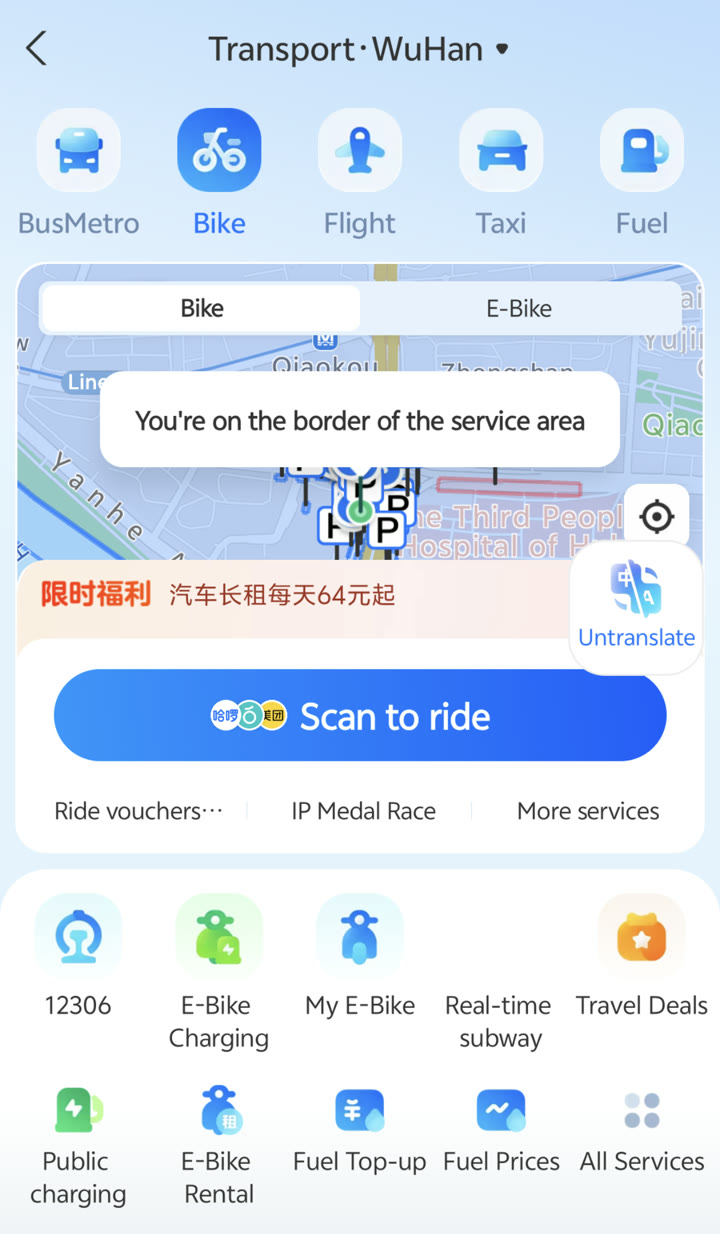 Alipay Transport hub in English: unified interface for unlocking shared bikes (Hellobike/Meituan), metro QR transit codes, and high-speed rail.
- Shared Bikes: Tap Bike → Scan to ride to unlock Hellobike or Meituan bikes directly through Alipay without needing a separate bike app or Chinese deposit.
- Metro & Bus: Tap BusMetro to activate your city’s local transit QR code. Turnstiles scan directly from your phone screen, deducting fare from your linked international card.
- High-Speed Rail (12306): Access official China Railway train bookings directly inside Alipay.
Alipay Health
In some cities (Hangzhou, Shanghai, parts of Guangdong), Alipay Health is integrated with hospital systems for:
- Booking outpatient appointments
- Paying medical bills
- Accessing digital health records
This varies significantly by city. In Wuhan, WeChat Health Mini Programs are more common than Alipay Health.
International Money Transfers
Alipay supports international transfers to some countries via the “World First” feature. Useful for sending money home or receiving international transfers, though fees apply.
Currency Exchange
Alipay can exchange foreign currency to RMB and back, within limits. Rates are generally close to market rate with a small fee.
Alipay vs WeChat Pay
| Feature | Alipay | WeChat Pay |
|---|---|---|
| Int’l card limits (per transaction / per year) | $5,000 / $50,000 | $5,000 / $50,000 (same regulatory caps) |
| Merchant acceptance | Excellent | Excellent |
| P2P transfers | ✅ Yes | ✅ Yes |
| Online shopping | ✅ Taobao/Tmall native | ✅ Works broadly |
| Mini programs | ✅ Good | ✅ More extensive |
| Social features | ❌ Limited | ✅ Messaging, Moments |
| Expat community | Less common | More common |
| English support | ✅ Good | ✅ Good |
Conclusion: Use both. WeChat Pay for daily small transactions (it’s tied to your social life app). Alipay for Taobao shopping, government/hospital services, and as backup. Limits and fees on international cards are identical across both apps.
Troubleshooting Common Issues
“International Card Not Supported”
Solutions:
- Try a different card (Visa tends to work better than Mastercard in some cases)
- Ensure your card is enabled for international/online transactions (call your bank)
- Try adding the card through Alipay’s web interface instead of the app
- Some prepaid cards and virtual cards don’t work — use a physical bank-issued card
“Verification Failed”
Solutions:
- Ensure passport details match exactly what the card issuer has
- Try verification during business hours (some manual review steps happen in China time zone)
- Contact Alipay support via in-app chat (limited English support available)
“Payment Declined at Checkout”
Solutions:
- Check your daily/single transaction limits
- Ensure Data Roaming is on (Alipay needs real-time verification)
- Try a different network or toggle Airplane mode
- Confirm the merchant accepts international card payments (not all Alipay QR codes accept foreign-linked cards)
Worked through these and still stuck? The dedicated Alipay foreign card not working fix guide walks all seven causes in the order that resolves them fastest.
App in Chinese Only
- Open Alipay → Profile → Settings (⚙️)
- Scroll to Language (语言)
- Select English
If you can’t navigate the Chinese interface, use Google Translate’s camera mode to translate the screen.
Alipay Security
Payment Passcode
Your 6-digit payment passcode is separate from your login password. Keep it:
- Different from your phone unlock PIN
- Memorized (don’t write it down visibly)
- Secret — never enter it while someone is watching
Biometric Authentication
Enable Face ID or fingerprint for payment in: Profile → Settings → Security → Biometric Login
This is faster and safer than the passcode in public.
If You Lose Your Phone
- Log in from another device immediately
- Go to Profile → Security → Log Out All Devices
- Report to Alipay customer service if suspicious transactions occurred
- Change password and payment passcode immediately
Common Scams
QR code swap: Criminals place fake QR codes over legitimate merchant codes. Always confirm the merchant name displayed after scanning before confirming payment.
Fake Alipay apps: Only download from official App Store or Google Play. Fake versions steal credentials.
Alipay for Specific Situations
Hospital Payments
Many Chinese hospitals accept Alipay for registration fees, prescription payments, and bill settlement — often via a dedicated hospital Mini Program within Alipay. This is faster than queuing at the cashier.
In Wuhan: Some hospitals in Wuhan use WeChat Health more than Alipay, but Alipay is still widely accepted at payment terminals.
Taxi and Ride-Hailing
DiDi (滴滴) can be logged into with Alipay and payment processed through your Alipay balance or linked card. An alternative to logging in with WeChat.
Street Food and Markets
Small vendors at night markets increasingly have both WeChat Pay and Alipay QR codes. If one doesn’t scan well, try the other.
Paying Rent
Some landlords prefer bank transfer, others use WeChat Pay, some use Alipay. For large amounts (rent), a Chinese bank account linked to Alipay is better than an international card (avoids potential holds on large transactions).
Quick Setup Checklist
- Download Alipay from App Store/Google Play
- Register with phone number
- Link international Visa/Mastercard
- Complete identity verification with passport
- Set payment passcode (6-digit, different from phone PIN)
- Enable Face ID/fingerprint for payments
- Test with a small purchase
- Bookmark Alipay in your home screen for quick access
Related Guides
- WeChat for Foreigners Guide — Set up WeChat Pay alongside Alipay
- How to Pay in China 2026 — Full payment landscape overview
- Opening a Bank Account in China — Unlock full payment functionality
- First Week in China Checklist — Payment setup in context of full arrival process
- Common Scams in China — QR-code swap and phishing patterns, and how to read the payment confirmation screen