Setting Up DiDi
- Download
International version: search "DiDi" in App Store or Google Play. The icon shows a car on a blue background.
- Register
Open DiDi → select your country code, enter your phone number, enter the SMS verification code, and allow location permissions (required for the app to function).
- Add Payment Method
International cards: DiDi international accepts Visa, Mastercard, JCB, American Express, and Discover. Tap Profile → Wallet → Payment Methods → Add Credit/Debit Card, enter card details, and verify via OTP to your phone. Alternative login/payment: you can also log into DiDi using WeChat or Alipay — payment is then handled by whichever platform you log in with.
常见问题
Is DiDi safe for foreigners?
Yes. DiDi is used daily by millions, including foreigners across China. The safety features, driver verification, and trip tracking make it at least as safe as taxis in any major city.
Can I use DiDi without WeChat?
Yes — the international DiDi app registers with a phone number and accepts direct card payment. WeChat login is optional but convenient.
Does DiDi work in smaller Chinese cities?
Mostly yes. DiDi operates in 400+ cities. Coverage diminishes in very small towns, but any city with significant urban population will have DiDi.
What if the driver can't find me at a mall or complex?
Large malls and apartment complexes can be confusing. Best practice: drop a pin on the main entrance gate, not the middle of the building, and add a text note (in Chinese or English) specifying which entrance.
Can I use Uber in China (2026)?
No — Uber does not operate in China. Uber sold its China business to Didi in 2016, and the Uber app won't hail cars in mainland China. The taxi apps that actually work are DiDi (this guide), plus Gaode Maps (高德打车, aggregates several fleets with an English option), Caocao (曹操出行), and Meituan's built-in taxi. If your Uber account keeps "searching for drivers" in China, that's why — switch to DiDi.
Can I use DiDi without a Chinese phone number?
Yes — with the international DiDi app. It registers with overseas numbers (SMS verification to +1, +61, +44, etc.) and works across China. If registration with your foreign number fails — it happens occasionally — the reliable fix is a Chinese SIM: see our phone number guide. Your eSIM data plan does not give you a number that can receive DiDi's SMS codes.
Can I pay DiDi with cash?
No — DiDi rides are paid in-app only (linked international card, WeChat Pay, or Alipay). You can't hand the driver banknotes. If you want to pay cash, take a street taxi instead: metered, cash-friendly, and everywhere. Estimate your typical rides in our pricing section above.
Quick Summary: DiDi is China’s dominant ride-hailing app — equivalent to Uber. The international version supports English, accepts international cards, and works across major Chinese cities. Download before arriving, link a payment method, and you won’t need to hail taxis or worry about language barriers. A ¥15–50 ride replaces most short urban journeys.
DiDi is one app in a wider stack — the Chinese Internet Survival Guide maps connectivity, +86 verification, payments, and the apps that matter.
Why You Need DiDi in China
Street taxis exist in Chinese cities, but they have real limitations:
- Drivers may not know how to reach your destination if you can’t say it clearly in Chinese
- No cashless payment guarantee (some older drivers still prefer cash)
- No rating system or driver accountability
- Can’t track your route or share trip with others
DiDi solves all of these. Your destination is entered as a map pin — no Chinese required. Payment is automatic. The driver’s route is tracked.
What DiDi is: China’s dominant ride-hailing platform (equivalent to Uber). Founded in 2012, it now handles hundreds of millions of rides per year. Uber exited China in 2016, selling to DiDi.
Which DiDi App to Download
There are two DiDi apps:
DiDi — Ridesharing App (国际版 / International Version)
- Available on iOS App Store and Google Play globally
- English language support
- International card payment
- Same driver pool as the Chinese app
- Some features may differ from the Chinese version
DiDi Chuxing (滴滴出行) — Chinese Version
- Chinese language only
- Requires WeChat or Alipay login
- More features, more service types
- Better for long-term residents
Recommendation: Start with the international version. Switch to the Chinese version once you’re settled and comfortable with the platform.
Setting Up DiDi
Step 1: Download
International version: Search “DiDi” in App Store or Google Play. The icon shows a car on a blue background.
Step 2: Register
- Open DiDi → select your country code
- Enter your phone number
- Enter SMS verification code
- Allow location permissions (required for the app to function)
Step 3: Add Payment Method
International cards: DiDi officially accepts overseas credit and debit cards across all major global card networks, including Visa, Mastercard, JCB, American Express, and Discover.
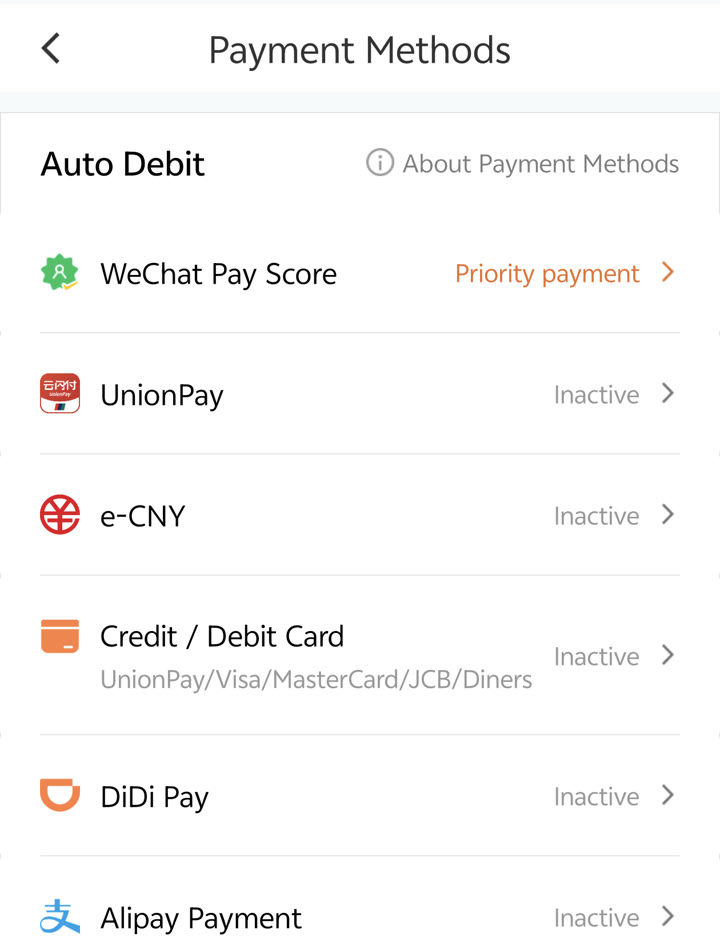 DiDi Payment Methods management screen in English, showing direct card bindings alongside WeChat Pay and Alipay.
- Tap Profile (top left avatar) → Wallet → Payment Methods → Credit/Debit Card
- On the Add an Overseas Bank Card screen, enter your card number, expiration date, and CVV/CVC code
- Complete the 3D Secure / OTP verification sent to your bank-registered mobile number
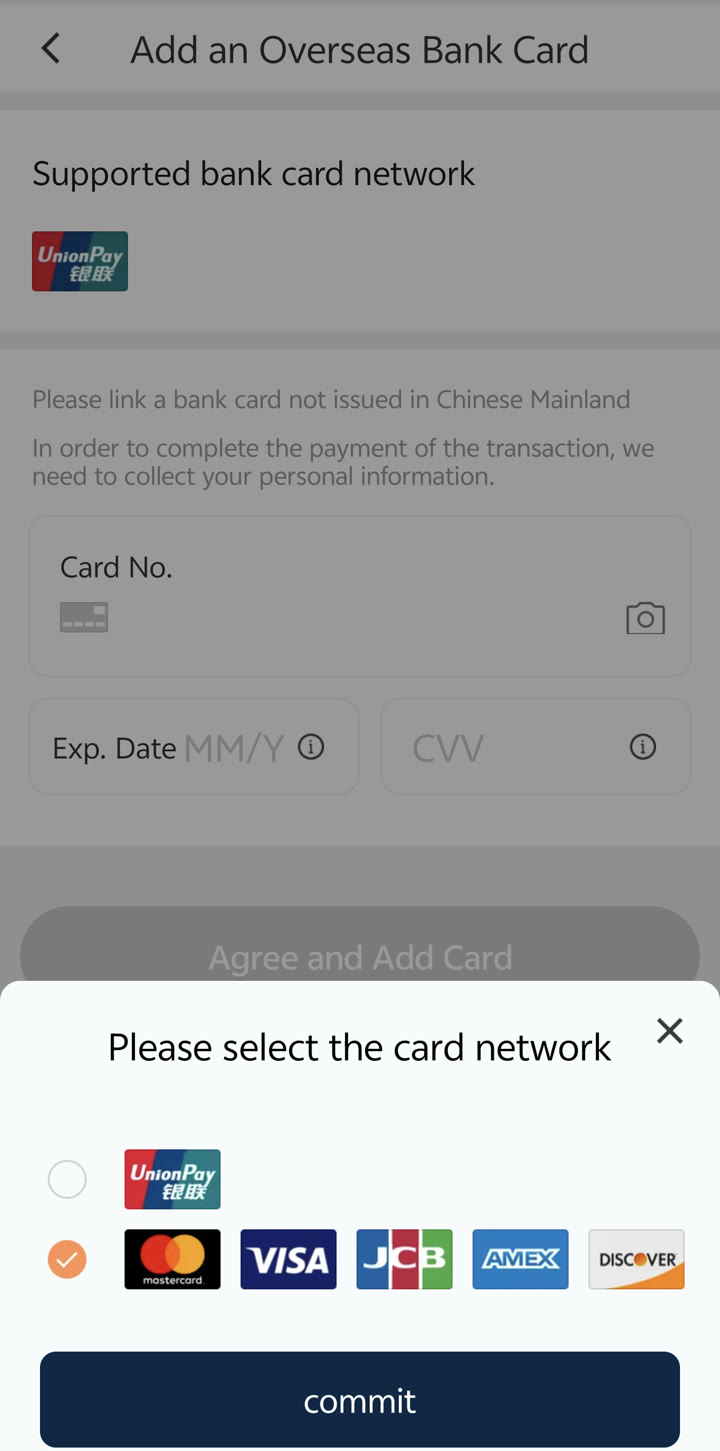 DiDi’s English “Add an Overseas Bank Card” form, explicitly supporting Visa, Mastercard, JCB, American Express, and Discover.
Alternative login/payment: You can also log into DiDi using WeChat or Alipay — payment is then handled by whichever platform you log in with.
Booking a Ride
Basic Ride Process
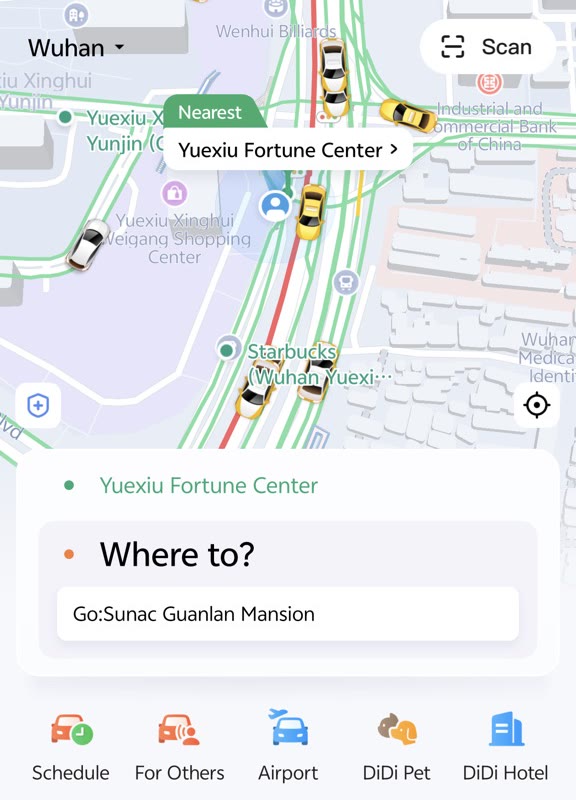 DiDi English interface home screen: map display with current pickup pin and the “Where to?” destination search bar.
- Open DiDi — app will detect your location automatically
- Tap in the Where to? bar (or destination field)
- Search for your destination in English or Chinese
- Select the correct destination from the results
- Choose service type (Express, Premier, XL)
- Confirm the price estimate
- Tap Confirm Order
- Wait for a driver to accept (usually 30–120 seconds)
Finding Your Driver
Once matched, you’ll see:
- Driver’s car make and color
- License plate number
- Driver’s photo and rating
- Real-time map showing where the car is
Meeting point: In busy areas, the pin may not drop exactly where you’re standing. Look at the license plate — drivers will sometimes call or message you. If your Chinese isn’t ready, share your live location via WeChat or simply look for the car matching the description.
Confirming the Ride
When you get in:
- Check the license plate matches the app
- The app will show the driver starting the trip
- You can share your trip status with a contact (safety feature)
At Your Destination
Payment deducts automatically. You’ll be prompted to rate the driver (1–5 stars). Rating helps the platform and is worth doing.
Service Types
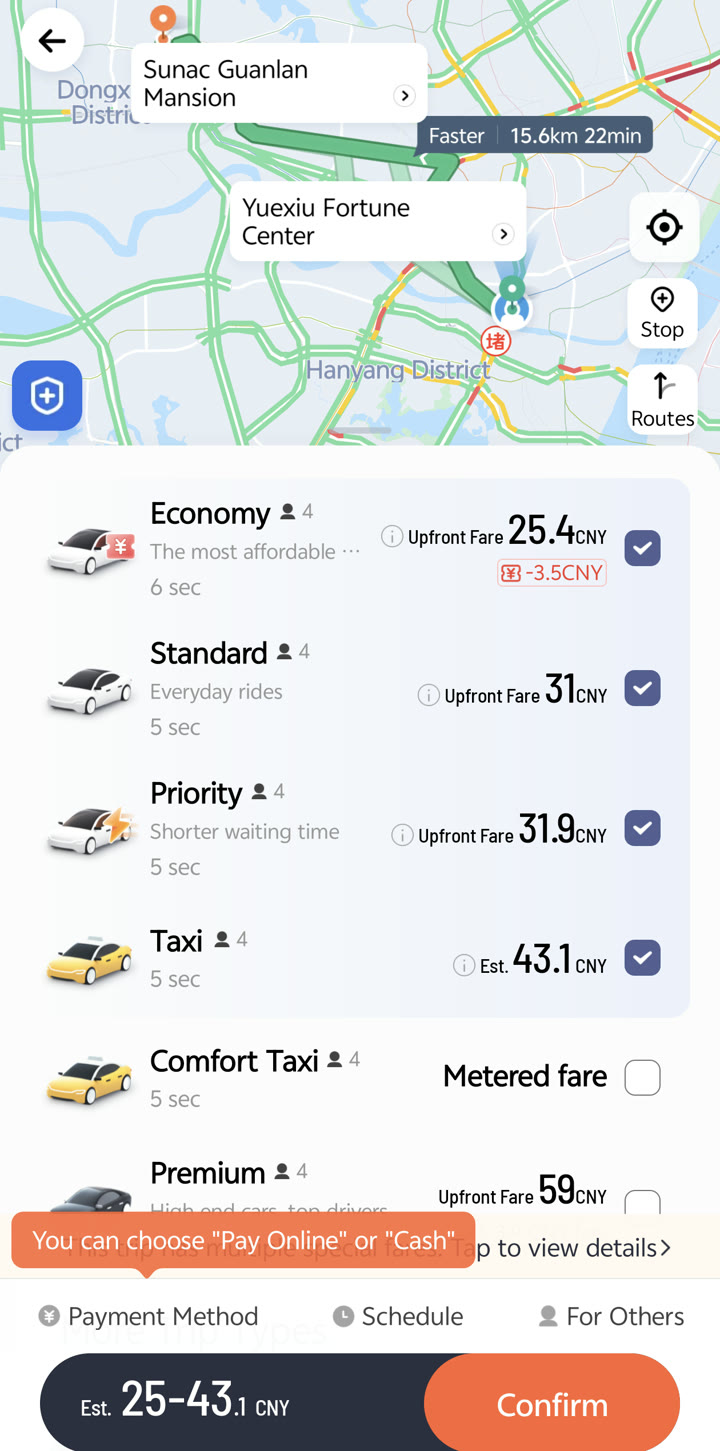 DiDi ride selection screen in English: comparing upfront estimated fares across Economy, Standard, and licensed Taxi tiers.
| Service | Description | Best For | Price |
|---|---|---|---|
| Economy / Express (特惠/快车) | Standard budget ride | Most journeys | Cheapest |
| Standard / Select (优享) | Newer vehicles, higher-rated drivers | Comfort, daily commuting | ~1.2x Economy |
| Premier (专车) | Higher-end cars, professional drivers | Business trips, airports | 1.5–2x Express |
| XL (六座) | 6-seater van | Groups, lots of luggage | ~1.3x Express |
| Taxi (出租车) | Official metered taxis via app | Traditional taxi experience | Meter rate |
| Bike (单车) | Shared bikes (some cities) | Short distances | ¥1–2/30 min |
For most situations, Economy / Express is the right choice — comfortable, affordable, and available everywhere.
Airport Rides
DiDi works at all major Chinese airports. A few things to know:
Designated pickup zones: Airports have specific DiDi/ride-hailing pickup zones (网约车候车区). These are usually in the arrivals basement or a separate area from taxi stands. Signs will direct you — look for 网约车 (wǎngyuē chē).
Surcharges: Airport pickups often have a small platform surcharge (¥5–15). This is normal.
Wait time: During peak arrival periods (especially international flights), driver matching can take 3–5 minutes longer than usual.
Alternative: For your very first arrival in China when you haven’t set up DiDi yet — licensed airport taxis at the taxi stand are safe and will have your destination written on a paper (some airports provide destination cards at the arrivals desk).
Deep dive: For the full arrival-hour playbook — finding the 网约车 pickup zone, night arrivals, and taxi-vs-DiDi tradeoffs — see our DiDi airport pickup guide.
DiDi Safety Features
DiDi has invested heavily in safety features after incidents in 2018:
Emergency button: In the app during a trip, there’s a shield/safety icon. Tap it to access:
- One-tap police call (110)
- Trip sharing to emergency contacts
- Audio recording of the ride
Trip sharing: Share your trip in real-time with a trusted contact. They see your route, driver details, and ETA.
Driver verification: Drivers are verified with real ID and vehicle registration. You can see the driver’s rating and trip history summary.
Route monitoring: DiDi monitors if drivers significantly deviate from optimal routes.
Safe: Yes. DiDi is used billions of times per year by locals and visitors without incident. The safety features are reassurance measures, not indicators of routine danger.
Communication with Drivers
Most DiDi drivers speak little or no English. This is not a problem — you’ve already entered your destination in the app, so the driver follows the navigation.
If the driver calls you:
- Common issue: Can’t find you, calling to pinpoint location
- Simply repeat your landmark or say “我在[landmark]” (Wǒ zài [landmark])
- Or: Use the in-app chat to share your location
In-app chat translations: DiDi’s Chinese app has built-in translation. The international app has limited in-app chat — for communication, use WeChat voice (translate button) as backup.
Useful phrases:
| Situation | Chinese | Pinyin |
|---|---|---|
| I’m at the entrance | 我在门口 | Wǒ zài ménkǒu |
| Please go straight | 直走 | Zhí zǒu |
| Turn left | 左转 | Zuǒ zhuǎn |
| Turn right | 右转 | Yòu zhuǎn |
| Stop here | 在这里停 | Zài zhèlǐ tíng |
| Thank you | 谢谢 | Xièxiè |
Want the full spoken playbook — the pickup call, route arguments, paying and receipts, with tap-to-hear audio for every line? See 50+ Chinese phrases for taxi in China.
Pricing and Tips
How DiDi Pricing Works
- Base fare: ¥6–12 depending on city and service type
- Per km rate: ¥1.2–2.5/km (varies by city, time of day, service type)
- Time rate: Additional per-minute charge during traffic/low speed
- Surge pricing: During rain, rush hour, and late night — expect 1.2–1.8x normal price
- Tolls: Added automatically if your route uses a toll road
Typical Journey Costs (Wuhan)
| Journey | Express Price |
|---|---|
| Short city ride (5 km) | ¥15–25 |
| Across districts (15 km) | ¥35–55 |
| Airport (Tianhe, 25 km from center) | ¥60–90 |
Avoiding Surcharges
- Avoid 7:30–9:00am and 5:30–7:30pm: Surge pricing likely during rush hour
- Rain: Expect 20–40% surge — consider metro instead
- Pre-book for airport: Schedule a pickup time in advance to lock in a normal rate
Alternatives to DiDi
If DiDi doesn’t work:
| Option | Notes |
|---|---|
| Gaode Maps (高德地图) | Has built-in taxi booking in English |
| Baidu Maps (百度地图) | Also has built-in taxi booking |
| Street taxis (出租车) | Still common, safe, accept cash |
| Metro (地铁) | Always an option in major cities |
| Meituan Taxi | Alternative ride-hailing inside Meituan app |
Street taxis: Still perfectly fine. Show the driver your destination on Google Maps or written in Chinese. Payment: cash (¥10–60 typical) or increasingly via WeChat/Alipay. Meter is always running — it’s not negotiable.
Troubleshooting
“No Cars Available”
- Time: Very early morning (3–5am) has fewer drivers
- Weather: Heavy rain reduces driver availability
- Location: Remote areas outside city center have fewer drivers
- Solution: Try a different service type (Premier/XL may have more cars) or wait 5 minutes and retry
Payment Failed
- Check your card is enabled for international transactions
- Ensure billing details match exactly
- Try adding a different card
- Login via WeChat or Alipay as alternative payment method
Driver Cancelled
Common if you’re in a hard-to-find location. Make sure your pin is accurate before confirming. If a driver cancels, the app will find a new one automatically.
Can’t Find the Car
- Call the driver via the app (call button in trip screen)
- Share your live location
- Look for the license plate — don’t look for a specific car model/color (can be inaccurate)
DiDi vs. Traditional Taxis
| Feature | DiDi | Street Taxi |
|---|---|---|
| Language barrier | Minimal (app) | High (verbal communication needed) |
| Price | Similar or slightly cheaper | Metered, may be lower for short trips |
| Payment | Automatic (card/WeChat/Alipay) | Cash or QR code (driver dependent) |
| Accountability | High (rated, tracked) | Lower |
| Availability at 2am | Good (search app) | Depend on finding one |
| Receipt | Digital, automatic | Paper from driver (ask for it) |
Receipts and Invoices
Every DiDi ride is paid in-app, so a digital record of the trip exists automatically — there’s nothing to ask the driver for. Getting paperwork your employer accepts is a quick in-app step.
Getting a Trip Receipt
- Tap your profile avatar (top left) to open the side menu
- Tap Trips (or My Trips / Trip History)
- Select the trip you need — the details screen shows the date, route, distance, and full fare breakdown
- Tap Receipt to view or export it, or send a copy to your email where the option is offered (Last verified: 2026-10-01)
In some app versions a receipt is emailed automatically when the trip ends — but don’t count on it in China, where receipts live in the app. If you expected an email and it hasn’t arrived, check your spam folder first. DiDi doesn’t publish a deadline for pulling up old receipts: trips stay listed in your trip history, and the 24/7 in-app English customer service can help with a past ride whose receipt option has moved or gone missing (Last verified: 2026-10-01).
Business Invoices (Fapiao)
For reimbursement inside China, finance teams often want a formal invoice — a fapiao (发票), the Chinese VAT invoice — rather than a plain trip receipt. DiDi can issue electronic VAT invoices for rides:
- Find the Invoice (开发票) option on the trip record or in the wallet/profile menu
- Choose the invoice title: individual (个人) or company (企业)
- Company invoices require the company’s registered full name and its taxpayer ID (税号) — enter both in the in-app invoice title form; the e-invoice is issued as a PDF you can download in the app or receive by email (Last verified: 2026-10-01)
Two practical notes for foreigners:
- If your employer just needs proof of spend for an international expense system, the trip receipt plus your card statement is usually enough — a fapiao mainly matters for companies registered in China doing tax bookkeeping.
- If the invoice option isn’t visible in the English interface, ask in-app customer service to issue one; DiDi staffs 24/7 bilingual support (Last verified: 2026-10-01).
DiDi Receipts vs. Taxi Receipts
| DiDi | Street taxi | |
|---|---|---|
| Form | Digital, in your trip history | Paper slip printed from the meter |
| How to get it | A few taps in the app | Ask the driver — say “fāpiào” (发票) |
| Company title | Entered in the app (with tax ID for companies) | Usually handwritten on the paper receipt |
| Best for | Email-based expense claims, reconciling many rides | Immediate paper proof on the spot |
Taxi paper wins for instant, on-the-spot proof — drivers print it at the end of the ride and can write your company name in by hand. DiDi’s strength is the opposite: every ride is already itemized in the app, so reconciling a week of business trips takes minutes instead of a pocketful of paper slips.
Related Guides
- China Transportation Overview — Metro, trains, buses, and more
- How to Pay in China 2026 — Payment methods DiDi accepts
- WeChat for Foreigners — Login with WeChat for seamless DiDi payment
- First Week in China Checklist — Transport setup in context